For Daft.ie & MyHome.ie

A little companion for a big decision.

Homeling lives on the listing sites you already use. Rate, flag and talk about every house with the person you're hunting with — and keep the whole search in one shared tracker, on your computer and your phone.

Built in Dublin. No account to create, no ads, nothing sold. Your household's data is yours.

€495,000
14 Ashfield Park, Terenure, Dublin 6W
3 bed · 1 bath · 88 m² · Terraced house · BER C2
Pending ViewingHighSat, 12 Sept, 11:3052 new
€465,000
27 Rathdown Villas, Kimmage, Dublin 6W
2 bed · 1 bath · 76 m² · BER D1
Seen by  Ana 2h agoSat, 12 Sept, 10:00Add
What your search results look like →
Works ondaft.iemyhome.ie· Chrome on your computer · any browser on your phone
On the listing

Everything you'd say about a house, right where the house is.

No copying links into a chat. Open a listing, slide out the Homeling panel, and it's all there — for both of you.

One thread per house

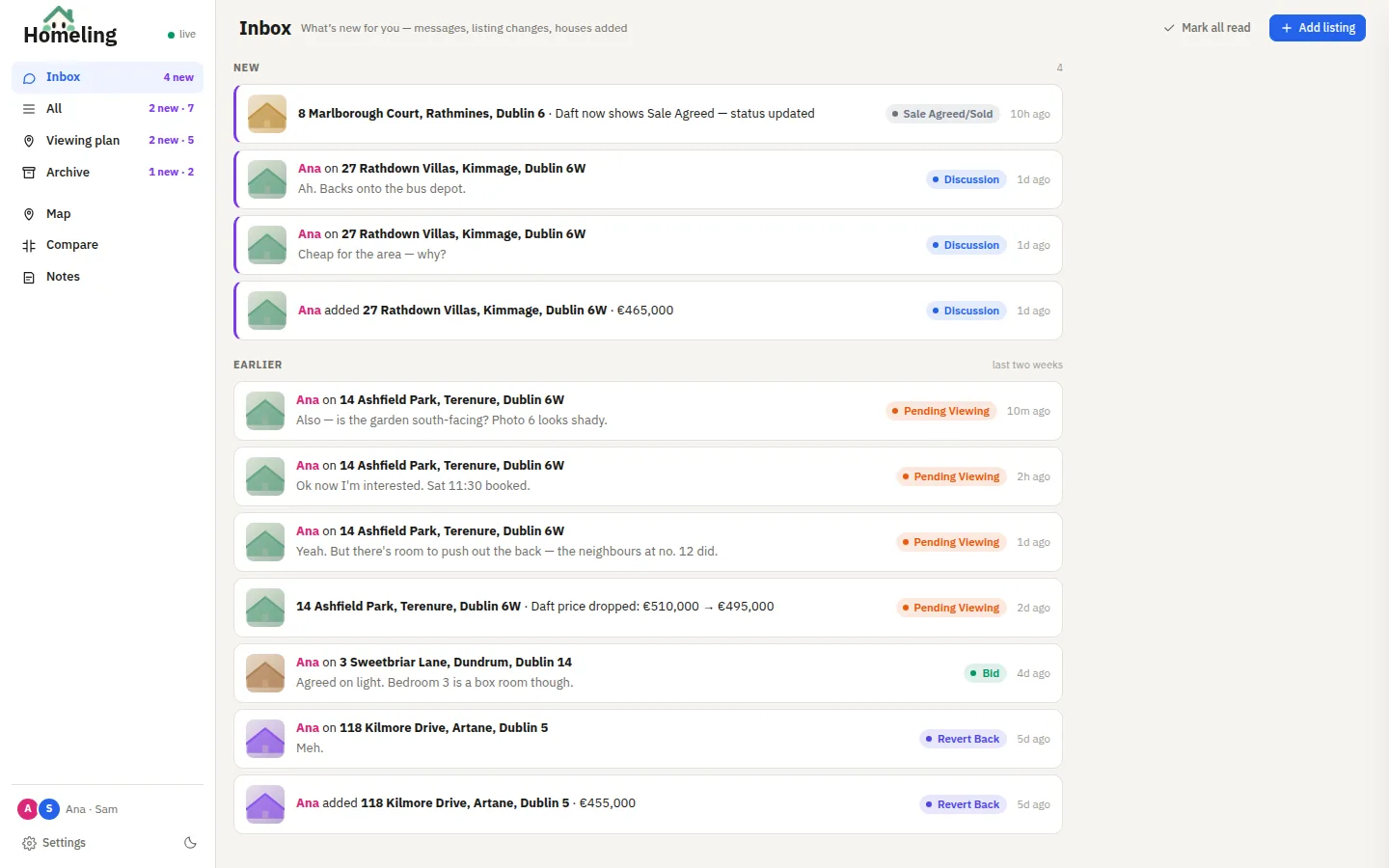
Messages, price drops and "Sale Agreed" all land in the house's own thread. Unread counts on the extension icon, an inbox for what's new, and a desktop chime if you want one.

Gut checks that say what they rate

Garden, interior, what's nearby, the road — a thumb from each of you, side by side. Veto flags for the dealbreakers. A weighted scorecard once you've been inside.

Marked on the search results

Every card gets a strip: status, priority, the next viewing and how many messages are waiting. Listings only one of you has opened say so. The real open-viewing times too — MyHome's "click to reveal" included.

Watches listings for you

Tracked listings are re-read in the background: price changes, Sale Agreed, new open viewings and withdrawn listings show up in the thread — and as a notification, if you like.

Agent details, one tap away

The agent and their number are pulled from the listing and called out at the top, tappable on your phone. Viewing time and viewing notes next to it.

Ads, gone

Banner ads, mortgage panels and agent pop-ups on both sites are quietly hidden, with one small note at the top of the page. Turn it off in Settings if you miss them.

The tracker

One list for the two of you.

Every house you're following, with its price, size, BER, status and priority — sortable, filterable, and live. Whatever one of you changes, the other sees straight away.

  • Statuses that match how a hunt actually goes: Research, Discussion, Inquiry sent, Pending Viewing, Viewed, Bid… and an archive for the ones that got away.
  • Details and Thread, side by side. The drawer opens on the conversation when there's something new.
  • Compare two or three houses head-to-head, disagreements highlighted.
  • Light or dark, your call.
homeling · tracker
The Homeling tracker: a table of houses with the drawer open on a conversation
Viewing plan

Plan a Saturday of viewings.

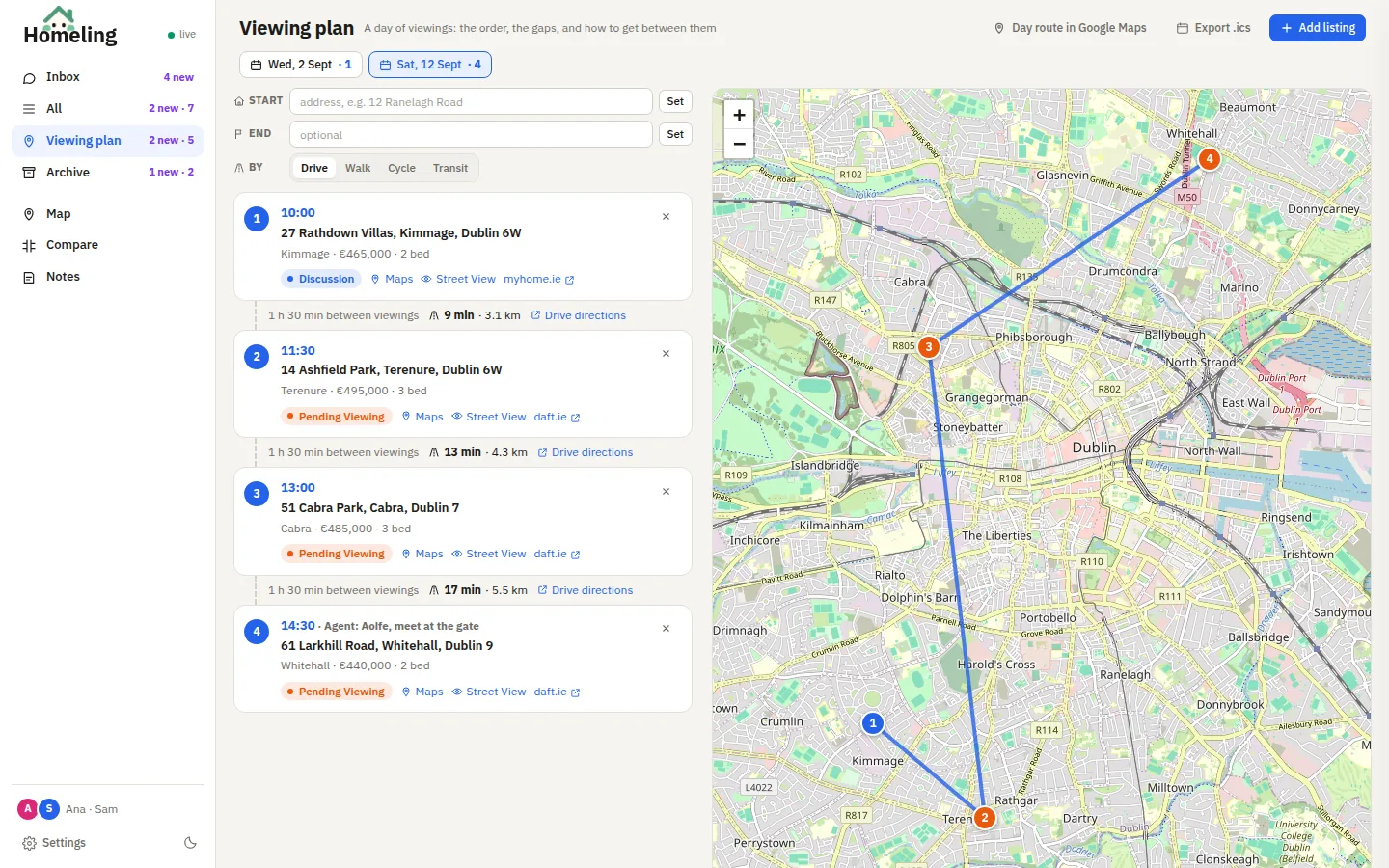
Put houses on the plan, and Homeling lines them up by day and time, on a map, with how long you've got between each and how long it takes to get there.

  • Drive, walk, cycle or transit — legs flagged when they'd eat into the gap, with directions for every hop.
  • Start and end anywhere: home, work, the car park.
  • Export to your calendar as .ics, or open the whole day as one Google Maps route.
homeling · viewing plan
A day of four viewings listed in order with travel times, and the route drawn on a map of Dublin
On your phone

The same tracker, in your pocket.

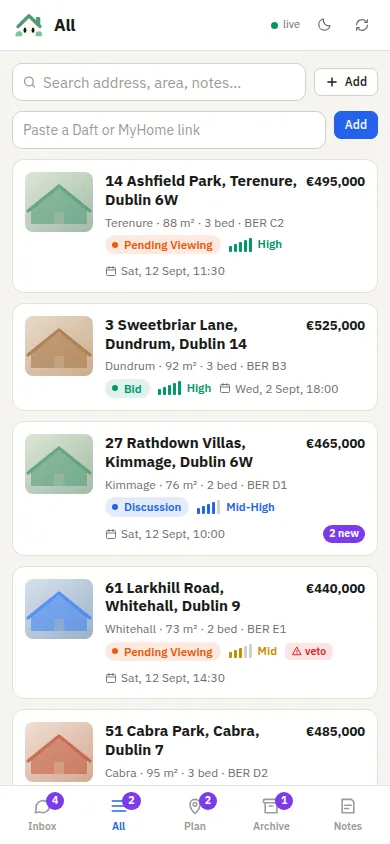
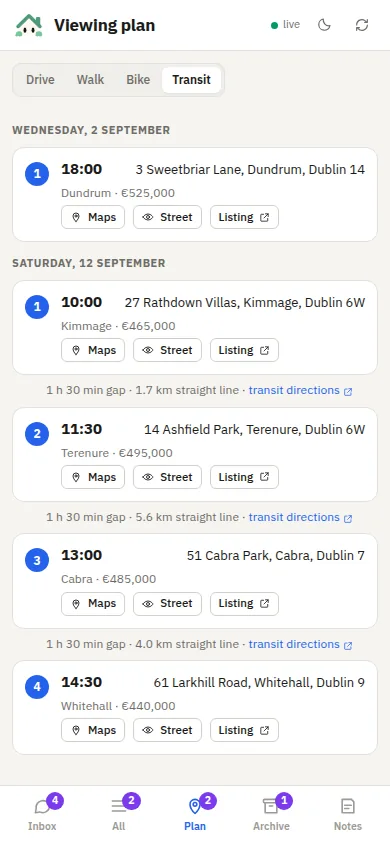
Open my.homeling.app, add it to your home screen, and you've got the inbox, every house, the viewing plan and the threads wherever you are. Notifications too, if you turn them on.

The list of houses on a phone

Every house, with a search and an Add button for pasted links.

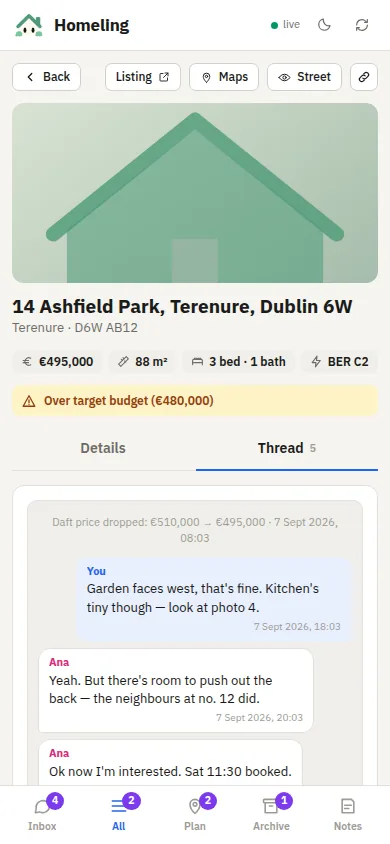
A house's thread on a phone

Details and Thread, with a "new messages" line so you know where you left off.

The viewing plan on a phone

The day's viewings in order, with directions for every leg.

Add a house from anywhere

Paste a Daft or MyHome link on your phone and it's in the tracker straight away — the price, photo and details fill in a moment later from a computer with the extension. Every house has a share link that opens it in Homeling.

Know the moment something changes

A message from your partner, a house they added, a price drop on one you're watching — a notification on your phone, and a chime on the desktop. Both optional.

How it works

Three steps, then just go house-hunting.

Install the extension

Download Homeling and load it into Chrome (about a minute — steps below). It sits quietly until you're on Daft or MyHome.

Make a household

The tracker gives you a household code and an invite link. Send it to whoever you're hunting with; they pick their name and they're in.

Hunt together

Open listings, rate them, add the ones worth talking about. Everything shows up for both of you, on every device, as it happens.

Install

Add Homeling to Chrome.

Homeling isn't on the Chrome Web Store yet, so it's a "load unpacked" install. Once loaded, it updates by unzipping the new version over the same folder.

  1. Download homeling.zip
  2. Unzip it somewhere permanent — Chrome runs it from that folder — e.g. ~/Homeling.
  3. Open chrome://extensions, turn on Developer mode (top right), click Load unpacked and pick the folder.
  4. The tracker opens: create a household, or paste the code your partner sent you. Pin the extension icon.
Works in Chrome and other Chromium browsers (Brave, Edge, Arc). On a phone, use my.homeling.app — no install needed.
homeling · inbox
The Homeling inbox: messages, houses added and listing changes in one feed
Questions

The short answers.

Is it free?

Yes. No plans, no trial, no "pro". It was built by one household for their own hunt and shared because it turned out to be useful.

Where does our data live?

In your household's own space in Homeling's database, keyed by a code only you two have. No email, no account, nothing to sign up for. Export everything as JSON or CSV any time from Settings.

Does it change anything on Daft or MyHome?

Only what you see: it adds a panel and the strips, and hides ads. It reads the listing's own data — it never sends an enquiry or clicks anything for you. Visiting a listing is never the same as adding it.

Which sites and browsers?

Daft.ie and MyHome.ie, in Chrome or any Chromium browser on a computer. The phone version works in Safari and Chrome on iPhone and Android, and it's best added to the home screen.

Do we both need the extension?

No. One of you can do the desktop side and the other can live entirely on the phone version — they see the same tracker and the same threads.

Why "Homeling"?

Because it's a little thing that lives on a bigger thing. He also peeks. You'll see.

Start the hunt together.

Install it on the computer you browse listings on, send your partner the invite link, and the next house you open is already a shared one.